Life Happens
Having a problem with your product? Don't worry. Start by finding your plan and we'll get you on your way.
Filing your Service Request is as easy as 1, 2, 3.

Product Details
Have your product details available

Problem with Product
Tell us the problem with your product

Verify Your Contact
Verify your contact information
We'll tell you how we'll service your service request to get you up and running.

Services and Support for all the tech in your home with Best Buy Membership – whether you purchased it from Best Buy or not. Click here for more information.

The GCID/Four Part Key format will change based on how you purchased your Plan. Review these instructions to find out how to enter the GCID/Four Part Key as well as your Plan number:
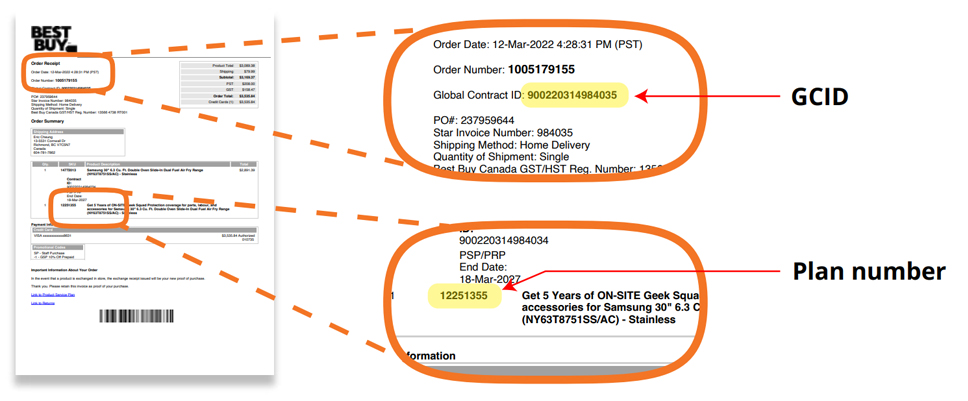
Open the electronic copy of your receipt (in PDF format) attached to the email you were sent when you purchased the Plan.
GCID: The 15-digit number labelled ‘Global Contact ID’ in the Order Receipt section under the Best Buy logo on the top left of the page is your GCID and should be entered as it appears here.
Plan number: Locate the item you have purchased the Plan for in the body of the receipt, under Product Description. The Plan will be listed directly below it. The number in the SKU column next to the plan is your Plan number.
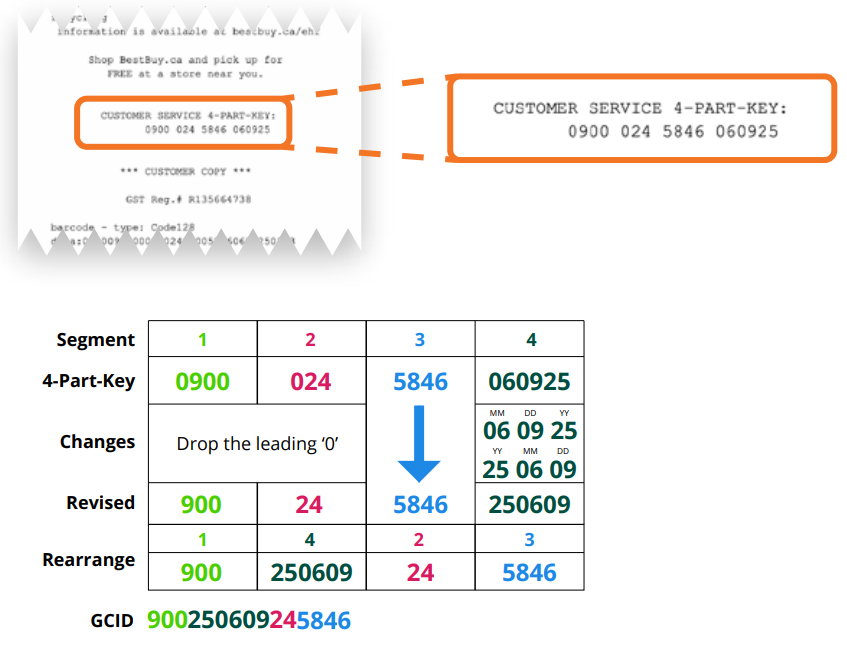
GCID: Note the string of digits labelled ‘CUSTOMER SERVICE 4-PART-KEY’ at the bottom of the receipt above the line denoting ‘customer copy’. Convert it to a GCID following these steps
- Drop the leading 0s in the first and second group of digits
- The last segment is the date you purchased the plan, formatted as MMDDYY. Change the date format to YYMMDD.
- Re-arrange the segments so that the new order is segment 1, segment 4, segment 2, segment 3.
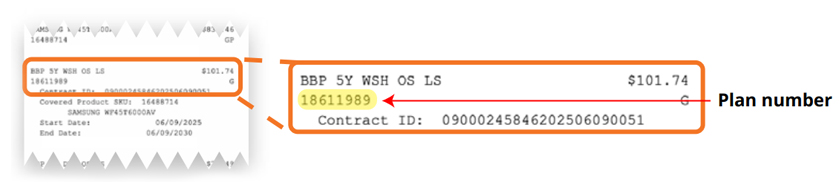
Plan number: To locate your Plan number, find the item on your reciept indicating the purchased plan for your product. The number below the line item is your Plan number.